
CAR GUY MATH TRACKER

What does your car actually cost you?

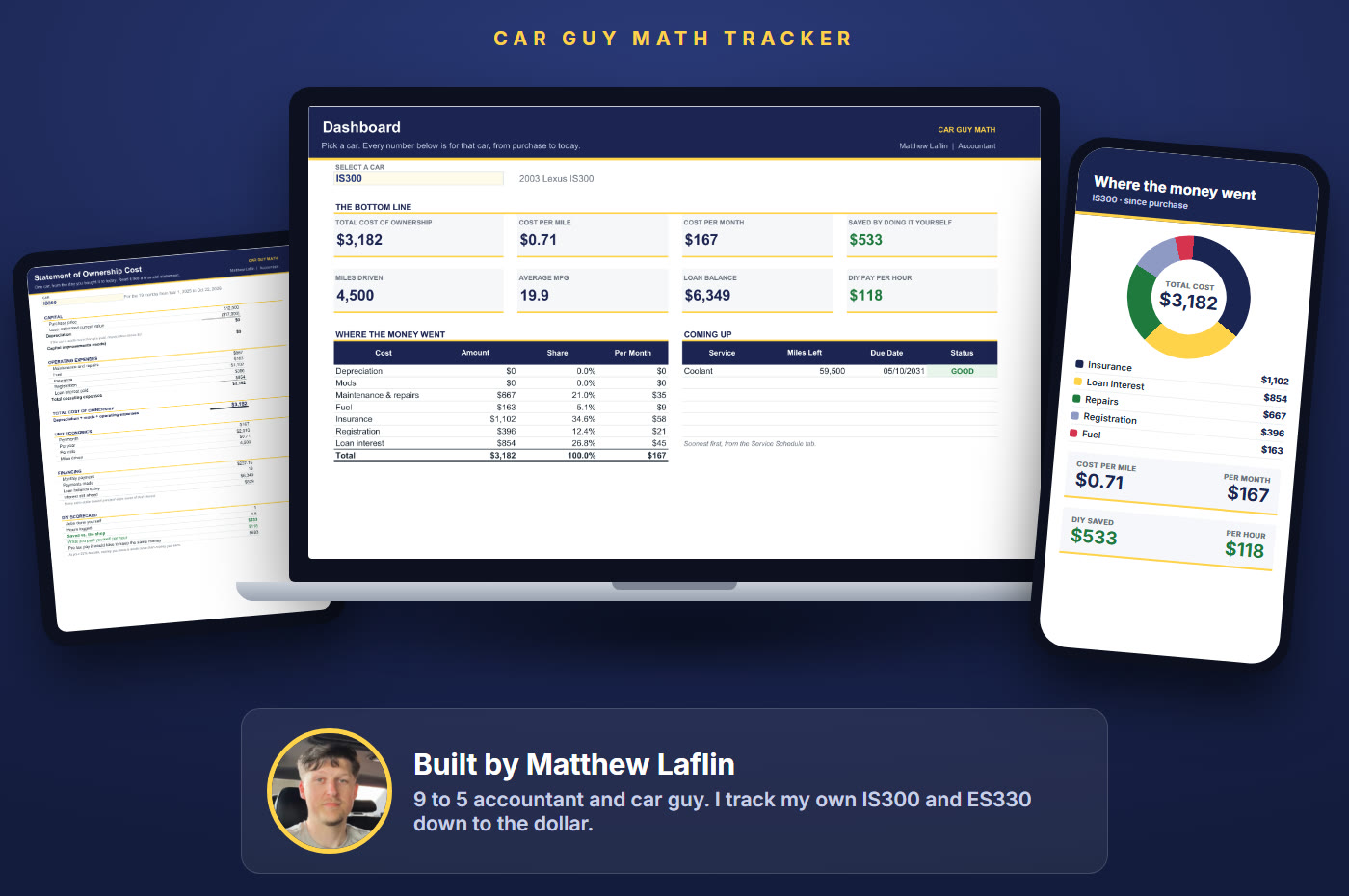
The spreadsheet an accountant built for his own cars. Your cost per mile, your true monthly cost, and every dollar you saved, calculated for you.
Your Image
✓
See your real cost per mile. Depreciation, repairs, fuel, insurance, registration and interest, all in one number.
✓
See which car is the money pit. Every car side by side: total cost, cost per mile and cost per month.
✓
Prove what DIY saves you. Log a job and see what you saved and what you paid yourself per hour.
$27 one payment
Google Sheets and Excel  ·  Up to 10 cars  ·  7 day guarantee
I'm ready. Take me to checkout ↓
Your Image

Everything included

1
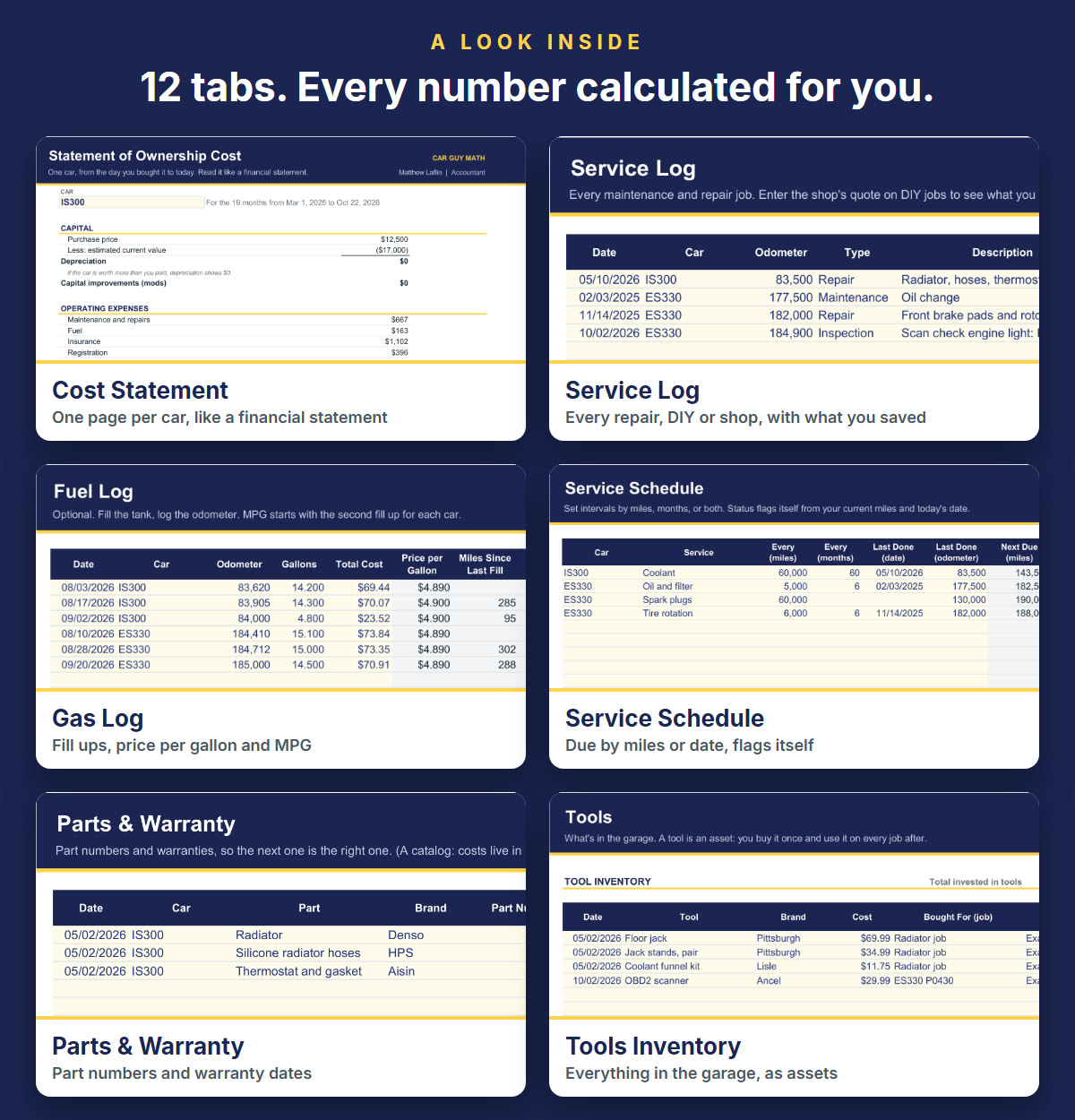
Dashboard: total cost, cost per mile, cost per month and DIY savings for any car, plus every car side by side.
2
Cost Statement: one page per car laid out like a financial statement. Depreciation, mods, repairs, fuel, insurance, registration and loan interest.
3
Service Log: every repair, DIY or shop. Enter the shop's quote and it shows what you saved and what you paid yourself per hour.
4
Gas Log: log the odometer at each fill up. Price per gallon and MPG calculate themselves.
5
Service Schedule: oil, coolant, brake fluid, anything. Due by miles or by date, and it flags itself when you're overdue.
6
Parts & Warranty: part numbers, where you bought them, and when the warranty runs out. The next part is the right part.
7
Mods: what the build really cost, kept separate from upkeep.
8
Tools Inventory: everything in the garage and what you paid for it.
9
Annual Summary: what each year cost you, all cars or one.
10
Garage + loan math: up to 10 cars. Enter the loan once and it works out your payment, balance and interest paid so far.
11
Start Here: 4 steps to get going, plus a typical service interval chart.
12
Calculations: every number the reports use, one row per car, so you can check the math yourself.
MY FIRST DIY JOB, LOGGED
$1,200 shop quote. $667 to do it myself.
$533 saved, about $118 an hour, tax free. The spreadsheet did the math.

Built for

Anyone with a car payment who wants the real number. Car guys who want to know what the build actually cost. DIYers who want proof the garage pays. One car or ten.

Questions

How do I get it?

Right after checkout, on the confirmation page and in your email. Tap Open in Google Sheets or Download for Excel.

Do I need Excel? Mac or PC?

No Excel needed. It opens free in Google Sheets on Mac, PC or Chromebook. Prefer Excel? There's an Excel download too.

Does it work on my phone?

Yes, in the free Google Sheets app. Logging a fill up at the pump takes 10 seconds.

Is it a subscription?

No. $27 once and it's yours.

I'm not a numbers person.

You type in the pale yellow cells. It does every calculation.

Is my info private?

Yes. It's your file. Nothing gets sent anywhere.

What if it's not for me?

If it doesn't show you a number about your car you didn't know, email me within 7 days and I'll refund you. No forms.

How do I reach you?

carguymathsupport@gmail.com

THE 7 DAY ACCOUNTANT'S GUARANTEE
Try it on your own car. If it's not worth $27, you get your $27 back.

Grab it below ↓

Terms. The Car Guy Math Tracker is a digital download for your personal use. Please don't resell or share the file. It's a tool for tracking your own numbers, not financial, tax or mechanical advice. Refunds: email carguymathsupport@gmail.com within 7 days of purchase for a full refund. Payments are processed securely by Stripe. By purchasing, you agree to these terms.

Checkout

Contact

Payment Methods

Apple Pay selected.

Another step will appear to securely submit your payment information.

Google Pay selected.

Another step will appear to securely submit your payment information.

Yes, add the DIY vs Shop app for $12

Before your next repair, put in the car and the job. It tells you DIY or pay the shop, the real cost both ways, and the parts and tools you'd need at three budget levels, with fitment warnings. Normally $27 on its own. Any car 1981 or newer.

Order Summary

[[invoiceItem.description]]
[[subscriptionsByProductId[invoiceItem.product_id].plan_description]]
REMOVE
[[invoiceItem.quantity]] x [[invoiceItem.unit_price | currency]]
Subtotal:
[[checkoutContext.order.invoice.subtotal | currency]]
Tax:
[[checkoutContext.order.invoice.tax | currency]]
Shipping:
[[checkoutContext.order.invoice.shipping | currency]]
Discounts:
-[[checkoutContext.order.invoice.discount | currency]]
Total:
[[checkoutContext.order.invoice.total | currency]]